Pose Detector
Finds a person's body and returns 33 landmarks, from the face down to the feet.
Basic use
import cv2 as cv
from detectors_world import create_detector

cap = cv.VideoCapture(0)

with create_detector("pose") as pose:
    while True:
        ok, frame = cap.read()
        if not ok:
            break

        bodies = pose.detect(frame)
        if bodies:
            print("Left shoulder:", bodies[0][11])

        cv.imshow("Pose Detection", frame)
        if cv.waitKey(1) & 0xFF == ord("q"):
            break

cap.release()
cv.destroyAllWindows()
Options
| Option | Default | Meaning |
|---|---|---|
model |
"full" |
Which model to use, see below |
max_poses |
1 |
Largest number of people to look for |
detection_confidence |
0.5 |
Minimum confidence to report a new body |
tracking_confidence |
0.5 |
Minimum confidence to keep following a body between frames |
static_image |
False |
Set to True for unrelated photos |
model_path |
None |
Use your own copy of the model file |
Choosing a model
| Model | Download | Use it when |
|---|---|---|
"lite" |
5.8 MB | Speed matters most, such as on small devices |
"full" |
9.4 MB | You want a balance of speed and accuracy |
"heavy" |
30.7 MB | Accuracy matters most |
pose = create_detector("pose", model="lite")
Landmark map
Each body has 33 landmarks. "Left" and "right" are the person's own sides, so in a photo of someone facing you, their left side is on your right. Odd numbers are on the left side of the body, and even numbers on the right.
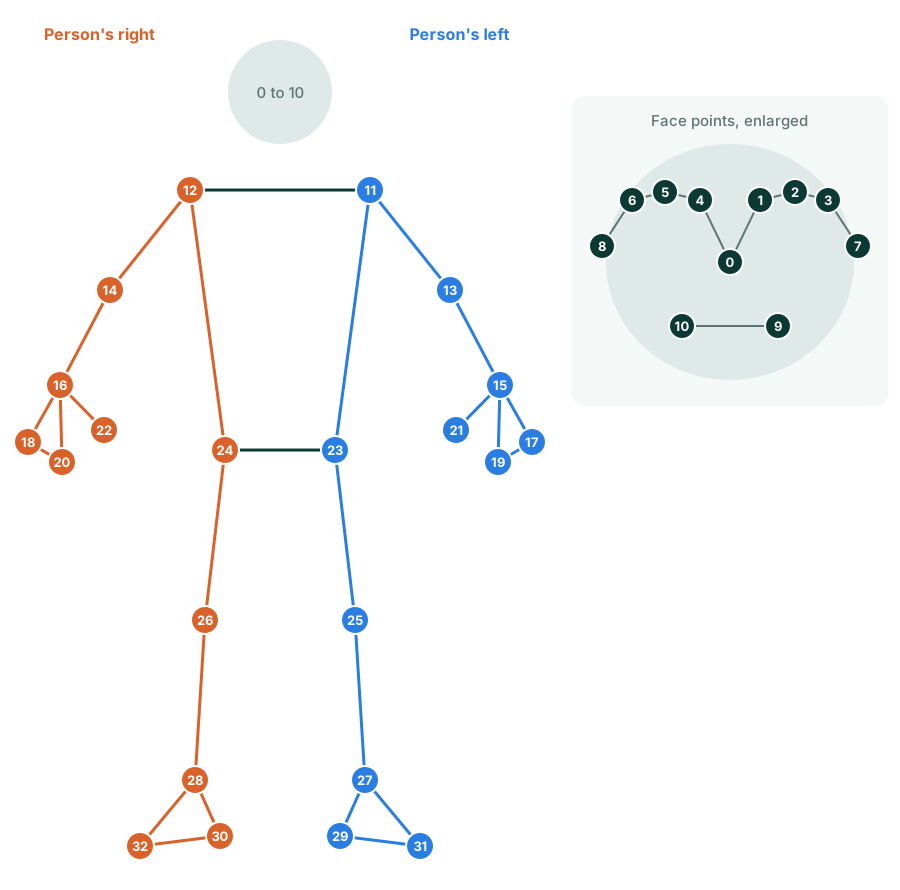
| Id | Name | Description |
|---|---|---|
| 0 | NOSE |
Nose |
| 1 | LEFT_EYE_INNER |
Left eye inner |
| 2 | LEFT_EYE |
Left eye |
| 3 | LEFT_EYE_OUTER |
Left eye outer |
| 4 | RIGHT_EYE_INNER |
Right eye inner |
| 5 | RIGHT_EYE |
Right eye |
| 6 | RIGHT_EYE_OUTER |
Right eye outer |
| 7 | LEFT_EAR |
Left ear |
| 8 | RIGHT_EAR |
Right ear |
| 9 | MOUTH_LEFT |
Mouth left |
| 10 | MOUTH_RIGHT |
Mouth right |
| 11 | LEFT_SHOULDER |
Left shoulder |
| 12 | RIGHT_SHOULDER |
Right shoulder |
| 13 | LEFT_ELBOW |
Left elbow |
| 14 | RIGHT_ELBOW |
Right elbow |
| 15 | LEFT_WRIST |
Left wrist |
| 16 | RIGHT_WRIST |
Right wrist |
| 17 | LEFT_PINKY |
Left pinky |
| 18 | RIGHT_PINKY |
Right pinky |
| 19 | LEFT_INDEX |
Left index |
| 20 | RIGHT_INDEX |
Right index |
| 21 | LEFT_THUMB |
Left thumb |
| 22 | RIGHT_THUMB |
Right thumb |
| 23 | LEFT_HIP |
Left hip |
| 24 | RIGHT_HIP |
Right hip |
| 25 | LEFT_KNEE |
Left knee |
| 26 | RIGHT_KNEE |
Right knee |
| 27 | LEFT_ANKLE |
Left ankle |
| 28 | RIGHT_ANKLE |
Right ankle |
| 29 | LEFT_HEEL |
Left heel |
| 30 | RIGHT_HEEL |
Right heel |
| 31 | LEFT_FOOT_INDEX |
Left foot index |
| 32 | RIGHT_FOOT_INDEX |
Right foot index |
Results
pose.detect(frame) returns a list of Landmarks, one per body:
bodies = pose.detect(frame)

if bodies:
    body = bodies[0]
    body.points       # 33 (x, y) pixel positions
    body.normalized   # 33 (x, y, z) values
    body[0]           # the nose, as (x, y)
label and score are None for bodies.
Landmarks are estimated even for parts out of view, so a position can be off-screen or approximate when a person is only partly visible.
Finding landmarks with locate()
pose.locate() returns one body as [[id, x, y], ...], and draws a dot on each landmark:
pose.detect(frame)
landmarks = pose.locate(frame, pose=0)
| Argument | Default | Meaning |
|---|---|---|
pose |
0 |
Which body to return, counting from 0 |
draw |
True |
Draw a dot on each landmark |
color |
(0, 255, 0) |
Dot color as (blue, green, red) |
radius |
6 |
Dot radius in pixels |
It returns [] if that body isn't visible.
Recipes
Measure a joint angle
An angle comes from three landmarks, such as shoulder, elbow and wrist:
import math

def angle(a, b, c):
    first = math.atan2(a[1] - b[1], a[0] - b[0])
    second = math.atan2(c[1] - b[1], c[0] - b[0])
    degrees = abs(math.degrees(first - second))
    return 360 - degrees if degrees > 180 else degrees

left_elbow = angle(body[11], body[13], body[15])
The Exercise Counter uses this to count repetitions.
Are the hands above the head?
A smaller y is higher in the image:
hands_up = body[15][1] < body[0][1] and body[16][1] < body[0][1]