Face Detector
Finds faces in an image and returns a box, a confidence score and 6 key points for each. It works best on faces within about 2 meters of the camera.
Basic use
import cv2 as cv
from detectors_world import create_detector

cap = cv.VideoCapture(0)

with create_detector("face") as face:
    while True:
        ok, frame = cap.read()
        if not ok:
            break

        faces = face.detect(frame, draw=False)
        face.locate(frame)   # draws a framed box and the score

        cv.imshow("Face Detection", frame)
        if cv.waitKey(1) & 0xFF == ord("q"):
            break

cap.release()
cv.destroyAllWindows()
Options
| Option | Default | Meaning |
|---|---|---|
detection_confidence |
0.6 |
Minimum confidence to report a face |
static_image |
False |
Set to True for unrelated photos |
model_path |
None |
Use your own copy of blaze_face_short_range.tflite |
Key point map
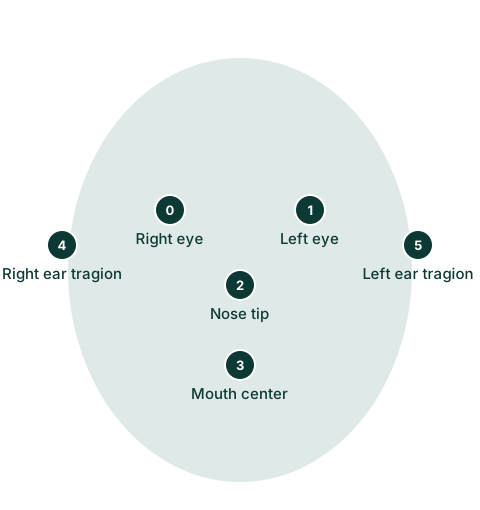
Each face has 6 key points. "Left" and "right" are the person's own sides.
| Id | Key point |
|---|---|
| 0 | Right eye |
| 1 | Left eye |
| 2 | Nose tip |
| 3 | Mouth center |
| 4 | Right ear tragion |
| 5 | Left ear tragion |
Results
face.detect(frame) returns a list of FaceBox, one per face:
faces = face.detect(frame)

for found in faces:
    found.x, found.y            # top-left corner
    found.width, found.height   # size
    found.box                   # (x, y, width, height)
    found.score                 # confidence from 0.0 to 1.0
    found.keypoints             # 6 (x, y) pixel positions
By default detect() draws a thin box and the key points. Part of a box can fall outside the image when a face is near the edge, so limit it before slicing the image:
x, y = max(found.x, 0), max(found.y, 0)
region = frame[y : found.y + found.height, x : found.x + found.width]
Drawing with locate()
face.locate() draws a framed box with the confidence percentage, and returns [[id, (x, y, width, height), score], ...]:
face.detect(frame, draw=False)
boxes = face.locate(frame)
| Argument | Default | Meaning |
|---|---|---|
draw |
True |
Draw the framed box and score |
color |
(0, 255, 0) |
Drawing color as (blue, green, red) |
It returns [] when no face is visible.
Recipes
Count people looking at the camera
print(f"{len(face.detect(frame))} faces")
Only report confident faces
face = create_detector("face", detection_confidence=0.8)
Find the closest face
The largest box is usually the closest:
closest = max(faces, key=lambda found: found.width * found.height, default=None)
Related
- Face Blur
- Face Mesh, if you need more than 6 points
Facein the API reference